Serial Communication Between Max/MSP and Arduino Using the ‘Serial’ Object

July 13th, 2010

I needed a script to send multiple values from Max/MSP to an Arduino to control a few components. After researching for a viable solution for my application, I had discovered that it is really easy to interface Max/MSP with an Arduino microcontroller by simply using the 'serial' object built-in into Max/MSP’s objects library.

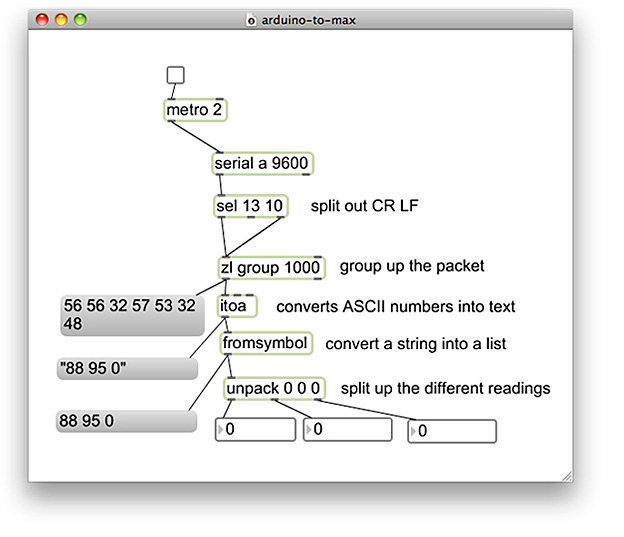
Screenshot of Arduino to Max/MSP Serial Patch

arduino-to-max.maxpat (Save Link As…)

I put together a clean serial Max patch which simply uses the 'serial' and 'unpack' objects to get analog and/or digital values coming from Arduino into Max/MSP. This solutions makes it really easy to get serial values from your Arduino into Max/MSP by splitting up the different readings and outputting them into number-boxes.

To make my Max/MSP and Arduino serial patch work, you will also need to copy and paste a really simple Arduino syntax into a new Arduino sketch I put together below. You may alternatively download my Max/MSP and Arduino sketch.

int val1 = 0;
int val2 = 0;
int val3 = 0;

void setup()
{
  // start serial port at 9600 bps:
  Serial.begin(9600);
}

void loop()
{
  // read analog input, divide by 4 to make the range 0-255:
  val1 = analogRead(0);
  val2 = analogRead(1);
  val3 = digitalRead(2); 

  Serial.print(val1, DEC);
  Serial.print(" ");
  Serial.print(val2, DEC);
  Serial.print(" ");
  Serial.print(val3, DEC);
  Serial.print("\r");
  // pause for 10 milliseconds:
  delay(10);
}

Like any Arduino interface you build, you will need to identify the pin numbers you are using from your Arduino, and determine whether the inputs you are using are sending digital or analog values. The below example is setup to read an analog value from pin ‘1′ and a digital value from pin ‘2′.

 val2 = analogRead(1);
 val3 = digitalRead(2);

The Arduino sketch and Max/MSP patch I put together is setup to recognize three inputs, two analog input values on pins ‘0′ and ‘1′, and one digital input value on pin ‘2′. There is no limit in how many values you can send to Max/MSP from Arduino, on the software side, so feel free to add additional pin recognition lines into the Arduino sketch if your interface requires additional inputs. If you are adding additional inputs, it is important to make sure that the Serial.print(”\r”); line always appears at the end of the loop function, directly before the delay function. This line of code simply let’s Arduino know that we are at the end of the loop.

Max/MSP Unpack Object

For every additional serial value you arrange to send to Max from Arduino, you will also need to add an additional ‘0′ symbol into the unpack object’s input list inside the Max patch. When you input a new symbol into the 'unpack' object, a new outlet will appear beneath the object, which outputs your inputs serial value corresponding to the pin you identified it with in your Arduino sketch. Once you are done tweaking your Arduino sketch, don’t forget to upload it onto your Arduino board!

That’s it! I connected a toggle switch onto the 'serial' object. Press the switch to either turn serial communication on or off between Max/MSP and Arduino.

For instructions on getting started with using an Arduino and a breadboard, I recommend visiting ITP’s Physical Computing resource page, which has many descriptive and illustrative tutorials on getting set up with an Arduino.

The Funny Side of Technology

March 25th, 2010

I think it is safe to say that for most of us, our relationship with technology is a love-hate affair. Tech gadgets that start out as luxuries quickly become must-have necessities. I have become hooked on invention, ingenuity, and innovative products over the past few weeks while doing research for my thesis at ITP. The question I keep asking myself is whether these problem-solving products actually make the world a better place?

Read more »

10 Interactive Video Art Projects that Get Physical with Screens

February 8th, 2010

People have always loved watching screens. The video screen has surged where people love this window onto a whole new world of possibility and opportunity. We are increasingly feeling this attraction with screens. Over the past decade we have seen the emergence of more and more screens with serious multimedia capabilities. Today, we use screens for informing, communicating, entertaining, and connecting. The following are ten of my favorite interactive video art projects that I believe make strong emotional connections with people using screens.

1. Potent Objects
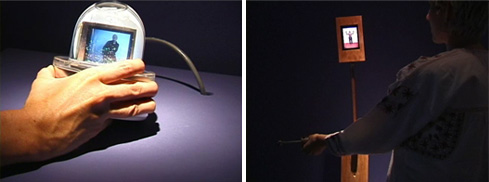
Potent Objects playfully examines the way we ascribe emotion to inanimate technologies. The work parallels current research in ‘affective computing,’ in which the capability of sensing and conveying emotion is built into computing devices. (Work by Camille Utterback)

Read more »

Mood Board

February 4th, 2010

A collection of images that will help inspire the design of my thesis project at ITP. Gathered from a wide array of sources, some of the artists’ and designers’ works assembled into my thesis mood board include Han Hoogerbrugge, Rafaeal Rozendall, Morgan Guegan, paperad, Redman, Slick Rick, and Craig Robinson.

You can view each individual image from my mood board on Jason Safir’s Flickr page.

Rusty Business Documentation

December 21st, 2009

Presented at the ITP Winter Show 2009 and NIME 2009, Rusty Business is a video sequencer that produces electronically controlled cartoon antics using large inflatable hammers.

0_DSCN2350 0_DSCN2458 0_DSCN2397 0_DSCN2430 0_DSCN2345 0_DSCN2390 0_DSCN2318 0_DSCN2433 0_DSCN2432 0_DSCN2381 0_DSCN2431 0_DSCN2389 0_DSCN2404 0_rusty_and_kids 0_DSCN2351 0_DSCN2436 0_DSCN2394 0_DSCN2403

A database of slapstick comedy gags are executed when inflatable hammers hit push button switches. The interactions performed by the users handling of the hammer produces a unique visual and auditory experience onto the projected montage displays. Every hit from the inflatable hammer triggers a different, unexpected and shocking reaction from the character, conveying his struggles with work, sickness and modern day insanities.

Read more »

Rusty Business @ NIME 2009

December 14th, 2009

This week I performed my new interactive comedy project “Rusty Business” at the ITP New Interfaces for Musical Expression Concert 2009 in Brooklyn at Southpaw. My project is a video sequencer that produces electronically controlled cartoon antics when large inflatable hammers hit jumbo push button switches. My performance also featured a guest appearance by Elie Zananiri who played the role as my character’s boss.


Click here to view more photos from the show. (Courtesy of LEESEAN)

Pacer Times

October 28th, 2009

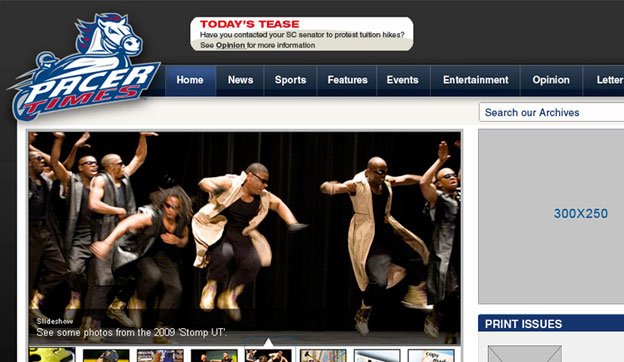
The web site I designed for the University of South Carolina Aiken’s online student magazine was recently launched. The site’s overall purpose is to provide a news resource for student’s studying at the University. My focus on their redesign was to create a more youthful and fun look to help students become more interested to engage in on campus social life, take a look.

The Joy of Smoking

October 22nd, 2009

The Joy of Smoking is a collection of humorous video clips about a smoker who will go to almost any lengths for a nicotine hit. This is the first prototype of my Headsprung video sculpture series that I am currently developing.

Read more »

Expressive Type.

October 5th, 2009

For this week’s assignment in my Visual Communications class, each student was asked to design three expressive words considering guidelines in typography. In addition, each student was asked to create six examples of their name choosing font preferences with at least one example of serif, san serif, decorative and script.

Read more »

Examples of Bad Signage.

September 28th, 2009

Is this guy really running for president? If he is, I don’t think this ad would help him get the votes he would need to win. Nevertheless, the design of the poster made me want to visit his web site. I think this advertisement is a clever way to get someone’s attention, but in the end of the day, I just don’t get what Tone Tank is trying to say.

Read more »